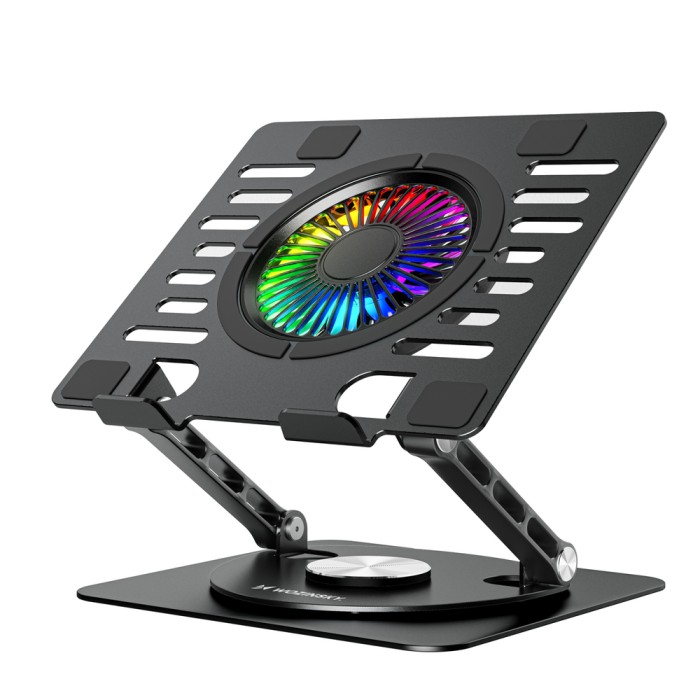
Wozinsky WDCX-X16-AS CoolBase RGB 360° Cooling Stand for Laptop and Tablet - Black
The Wozinsky CoolBase is an aluminum workstation with a built-in RGB fan that actively dissipates heat from under your laptop during long work or gaming sessions. The 110mm fan operates at 1200 RPM and 39 CFM, generating just 17-22 dBA—inaudible in quiet environments. A 360° swivel mechanism in the base allows you to change the screen's direction at any time without moving your setup, while two USB 2.0 ports on the side eliminate the need to reach behind your laptop. The aluminum frame with ventilation slots supports devices up to 5 kg without sagging, while silicone pads protect your hardware and desktop. The steel construction and thoughtful details make the CoolBase an accessory that will last for years, regardless of how intensively it is used.
~
Specification:
Brand: Wozinsky
Model: Wozinsky WDCX-X16-AS CoolBase
Dimensions: 240 x 230 x 50 mm
Fan: 110 x 110 x 15 mm; 1200 ±10% RPM; 39 CFM; 17-22 dBA; DC 5V
The most important advantages of the Wozinsky CoolBase 360° RGB stand:
Active cooling: A 39 CFM fan actively draws heat away from underneath your laptop, lowering its operating temperature.
Quiet operation: noise level of 17-22 dBA makes the fan inaudible even in a quiet room.
360° rotation: The rotating mechanism in the base allows you to smoothly change the screen orientation in any direction.
Built-in USB hub: Two USB 2.0 ports on the side of the stand expand the number of available connections without additional accessories.
RGB backlight: 10 fan lighting modes allow you to customize the appearance of your workstation to your preferences.
~
High-performance fan effectively cools the laptop
A built-in 110mm, 1200RPM fan pushes 39 CFM of air directly under the laptop, removing accumulated heat. An aluminum plate with ventilation slots further enhances airflow, protecting the processor and battery from overheating during intense work.
Low noise level does not interfere with focused work
The fan operates within a 17-22 dBA range, ensuring no disruption to work, calls, or relaxation. Adjusting the fan speed with a knob allows you to adjust the cooling intensity to your current needs without increasing the noise level.
The swivel base allows you to position the screen in any direction
The rotating plate in the base allows you to smoothly rotate your laptop a full 360° without removing it from the stand. Present content to colleagues, work from either side of the desk, or change the viewing angle—all without rearranging your entire workstation.
Two USB ports expand the configuration options of the station
A built-in hub with two USB 2.0 ports located on the back of the stand allows you to connect a mouse, keyboard, or flash drive without reaching for your laptop. A single USB port on your laptop is all you need to run the entire setup.
RGB backlight gives the workstation an individual character
The RGB-backlit fan offers 10 lighting modes, from a calm, single-color glow to dynamic rainbow effects. The lighting mode and speed are adjusted using a knob located on the side of the base.
Attributes
Category
Laptops Stands
No questions about this product, be the first and ask your question.